RBI compliant multi-factor authorisation
that gives you bank grade security with improved agility
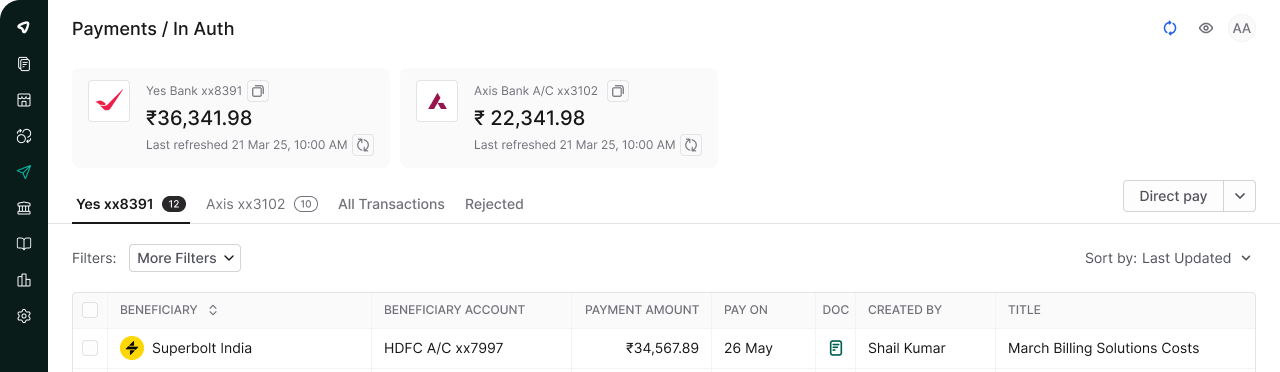


Connect accounts from ICICI, Yes, Axis, IDFC First, HDFC, and more. Create and pay from any connected account in Mysa.

Connect multiple operating bank accounts and create or pay directly from any linked account in Mysa

Transactions secured with MFA, pennyless bank verification, and RBI compliance. ISO 27001 & SOC 2 certified

Authorise up to 100 payments per bank account with a single OTP. Same transaction password across all banks.

Mysa auto-fetches UTRs from bank statements and reconciles them with bill entries
Guru and Jana went from spending 30-40 minutes daily on payment creation to processing hundreds of payments in minutes.
View real-time balances across accounts, self-transfer funds between your own accounts, and manage payments from a single dashboard
Admins can authorize up to 500–1,000 payments at once across connected accounts on mobile or desktop. A single OTP executes all approved payments
Vendors and teams receive payment confirmations via email, Slack, SMS, and WhatsApp, with full bill details like amount paid, UTR, TDS, and bill reference

Vendor payables and reimbursements in different tabs. Authorization queues organized by bank account for clear approval workflows.

Group multiple bills by vendors, or process each bill separately based on your payment terms.
Change vendor bank account information before processing to handle last-minute vendor requests without skipping compliance and control
Select NEFT/RTGS for saving cost or IMPS for speed. Go ahead with the auto selection or override on phone or web.

Organize by due dates or custom tags. Quickly identify which payments need immediate processing.

Adjust amounts in bulk, change payout accounts, hold GST components. Mysa automatically prevents duplicate payments.

"As we were expanding with so many locations, the number of payments, reconciliations, and authorizations kept increasing. We would have had to take a few more buildings to run a large finance operation, which we definitely did not want to."
Gautam Balijepalli
Founder, Kouzina Food Tech


"The mobile app makes authorizing payments incredibly simple. I can review and approve transactions from anywhere, which has completely transformed how we handle our financial operations. What used to be a weekend task is now completely automated."
Mohamed Iyaz
COO, Augnito
Everything you need to know about the product
Mysa can connect to 15+ business banks including ICICI, Yes Bank, Axis Bank, IDFC First Bank, and HDFC Bank and more.
Yes, Mysa supports easy direct payments to vendors. You can also adjust advance payments against a vendor when an invoice arrives.
Any advance payment made to a vendor that has not yet been adjusted will be available during the finance review. The reviewer can allocate the appropriate amount to offset the tax invoice, determining the net payable amount.
Mysa is ISO 27001 and SOC2 certified, uses multi-factor authentication, performs penniless bank account verification, and follows all RBI compliance requirements.
Yes. Admins can authorize up to 100 payments at once from the Mysa mobile app or desktop.
Yes. Mysa fetches UTR numbers from bank statements and matches them to bill entries in your ERP as payments are processed.
Yes. You can switch the source bank account for any payment before authorization.
Vendors and team members receive notifications via email, Slack, SMS, and WhatsApp with complete payment details including amount, UTR, TDS, and outstanding balance.
Connect your operating accounts to Mysa and manage all payments from one secure platform.